Microsoft released Microsoft Edge 120 recently. The latest update of its modern web browser did not introduce much in the feature department, at least when you consult the official release notes.
Microsoft did introduce new Telemetry almost silently. The only reference is found under "new policies".
Windows 11 users who run Microsoft Edge may enable support for the operating system's visual effects in Microsoft Edge. The feature is available as an experimental flag at the time of writing. Users need to enable it manually before the change becomes visible in Edge.
Microsoft introduced the Mica design when it launched Windows 11. Microsoft Edge did support it previously, but Microsoft pulled it after users started to report performance issues related to the design.
Enabling Windows 11 visual effects in title bar and toolbar in Microsoft Edge
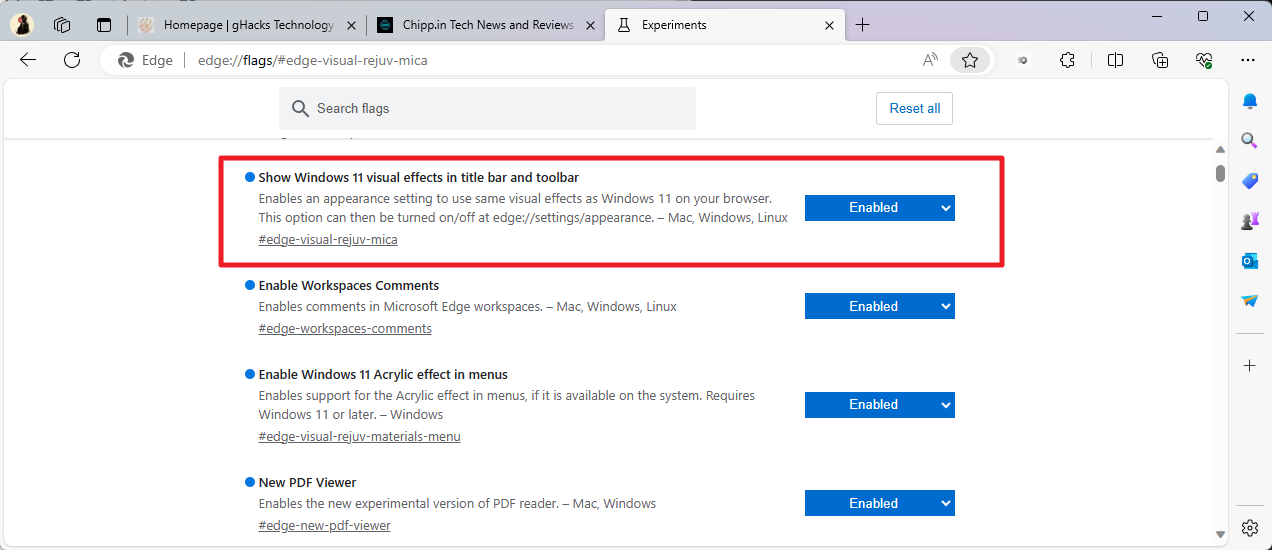
Here is a step-by-step guide on enabling the visual facelift in Microsoft Edge. Please note that this is only having an effect on Microsoft's Windows 11 operating system and not any of the other systems Edge is available on.
- Select Menu (three dots) > Help & Feedback > About Microsoft Edge.
- Install any update that is found. The version needs to be at least 120.0.2210.77.
- Load edge://flags/#edge-visual-rejuv-mica in the address bar of the Edge web browser.
- Change the state of Show Windows 11 visual effects in title bar and toolbar to Enabled.
- Restart the browser.
Edge applies the visual effects of the Windows 11 operating system automatically.
Microsoft describes Mica in the following way: "Mica is an opaque, dynamic material that incorporates theme and desktop wallpaper to paint the background of long-lived windows such as apps and settings."
Note: if you notice performance issue after enabling the design in Microsoft Edge for Windows 11, repeat the steps outlined above but set the state of the feature to Default or Disabled. This restores the original design in Edge.
Verify that the Mica design is enabled
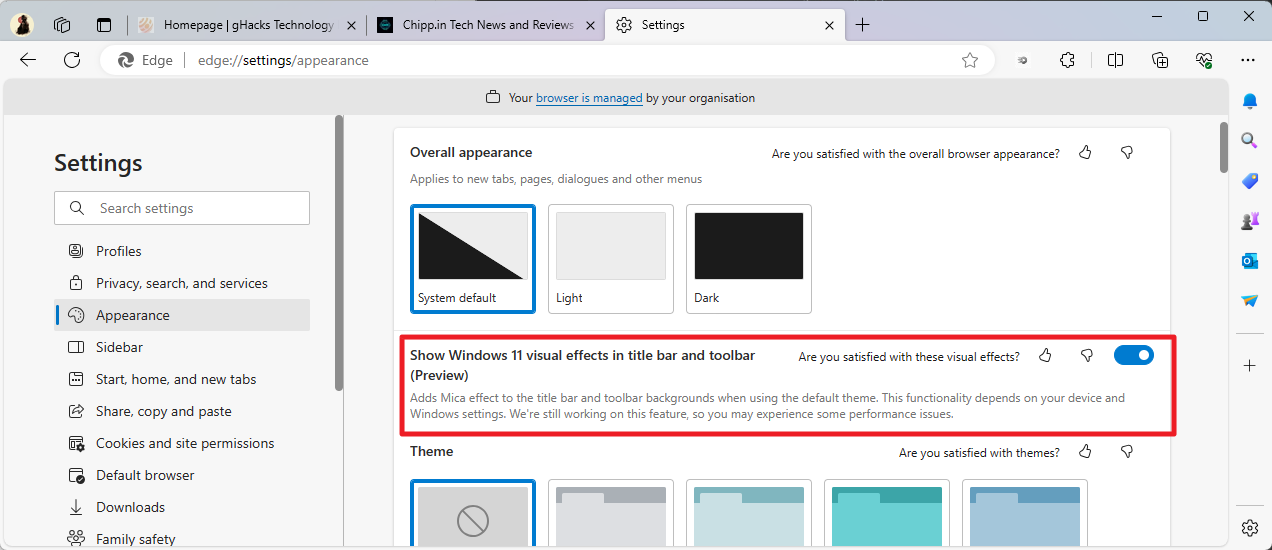
Here is how you can verify that visual effects of Windows 11 are supported by Microsoft Edge:
- Load edge://settings/appearance in the address bar of the Edge browser.
- Scroll down until you find "Show Windows 11 visual effects in title bar and toolbar (Preview)".
- There is a toggle that determines if the feature is enabled or not.
If you do not see the option, Mica is not enabled in Microsoft Edge.
Microsoft provides a description of what the setting does in Edge on Windows 11: "Adds Mica effect to the title bar and toolbar backgrounds when using the default theme. This functionality depends on your device and Windows settings. We're still working on this feature, so you may experience some performance issues."
Closing Words
Microsoft relaunched support for Windows 11's Mica design as a preview in Microsoft Edge 120. The company admits that users may experience performance issues after enabling the feature. Users who enable the feature and notice these issues may disable it again to restore the status quo.
Now You: do you use Microsoft Edge regularly or sporadically? (via Windows Area)
